
Trama
Talk plainly and create macOS native automations
About Trama
Trama is a groundbreaking automation tool for macOS users that simplifies the process of creating and managing automations. Unlike traditional options like Zapier or Shortcuts, which rely on visual blocks and flow diagrams that can feel technical, Trama allows users to describe repetitive tasks in natural language—any language, not just English—and have it automatically convert those descriptions into native macOS automations. With deep integration into macOS features such as AppleScript, shell scripts, OCR, and screen awareness, Trama offers a powerful, intuitive way to streamline workflows. Its AI-driven approach not only suggests automations based on user behavior but also explains and fixes errors in real time, making automation accessible even for non-programmers. Supporting major AI models like Claude, GPT, Gemini, and Groq, Trama aims to democratize automation for a broader audience, especially those who prefer speaking or writing naturally instead of coding.
Screenshots
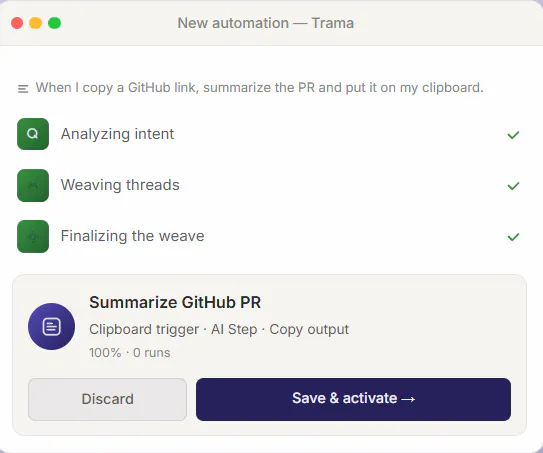
Pros
- ✓User-friendly natural language interface simplifies automation creation
- ✓Deep macOS integration including AppleScript, shell, OCR, and screen awareness
- ✓AI-powered suggestions and error explanations enhance usability
- ✓Supports multiple AI models for flexible automation workflows
- ✓Removes the need for programming knowledge, making automation accessible
Cons
- ✗Currently, the product has no user reviews or ratings available
- ✗Specific pricing details are not provided, which could impact budgeting decisions
- ✗Limited information on advanced customization or complex workflows
Use Cases
Pricing
Pricing not verified
Quick Info
Topics
Makers

ErnandesCavalheiro
Similar Tools in AI Assistants




Embed Badge
Add this badge to your website to show that Trama is featured on Visalytica.
<a href="https://www.visalytica.com/tool/trama" target="_blank" rel="noopener noreferrer" style="display:inline-flex;align-items:center;gap:6px;padding:6px 14px;background:#7c3aed;color:#fff;border-radius:8px;font-family:-apple-system,system-ui,sans-serif;font-size:13px;font-weight:600;text-decoration:none;transition:background .2s" onmouseover="this.style.background='#6d28d9'" onmouseout="this.style.background='#7c3aed'"><svg width="14" height="14" viewBox="0 0 24 24" fill="none" stroke="currentColor" stroke-width="2.5" stroke-linecap="round" stroke-linejoin="round"><path d="M12 20V10"/><path d="M18 20V4"/><path d="M6 20v-4"/></svg>Featured on Visalytica</a>