
TrackNotch
LLM usage tracking that lives in your Mac's notch
About TrackNotch
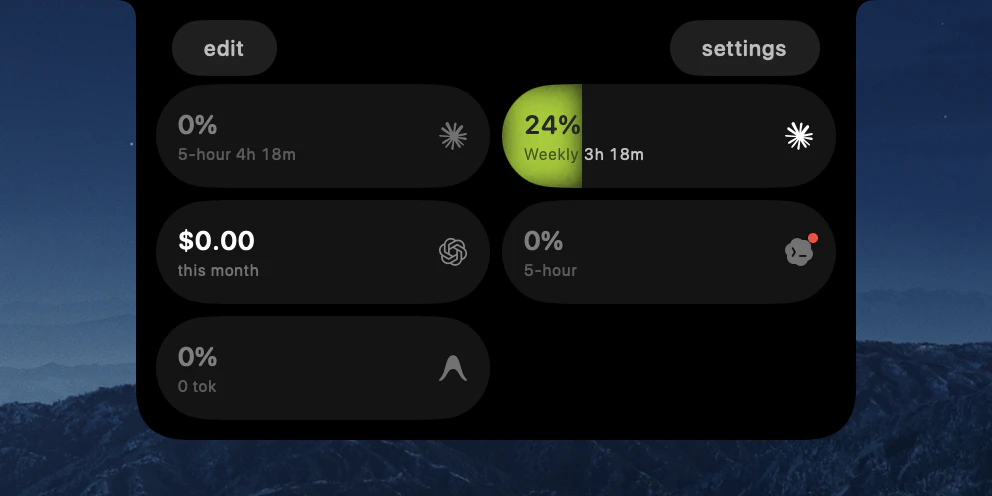
TrackNotch is a sleek, native macOS application designed for developers and AI enthusiasts who want real-time insights into their language model usage without compromising privacy. By integrating directly into the Mac's notch area, it provides immediate visibility into usage metrics for Claude, OpenAI, Cursor, and Codex, making it ideal for those who need to monitor API consumption and stay within budget limits. What sets TrackNotch apart is its commitment to privacy and local operation—no proxies, telemetry, or data leaving the machine—making it a trustworthy choice for security-conscious users. Its open-source nature invites community involvement, customization, and transparency, while its simple, unobtrusive interface ensures it complements the macOS environment seamlessly. Whether for individual developers, teams managing AI costs, or enthusiasts tracking personal projects, TrackNotch offers an innovative way to keep AI usage front and center.
Screenshots



Pros
- ✓Privacy-focused with local data processing
- ✓Seamless integration into Mac's notch area
- ✓Supports multiple AI models (Claude, OpenAI, Cursor, Codex)
- ✓Open-source and customizable
- ✓No reliance on proxies or external telemetry
Cons
- ✗Limited to macOS devices with a notch
- ✗No built-in advanced analytics or reporting features
- ✗Potential learning curve for non-technical users
Use Cases
Pricing
Free and open-source, with no paid tiers or subscriptions required.
Quick Info
Topics
Alternatives
Similar Tools in AI Assistants




Embed Badge
Add this badge to your website to show that TrackNotch is featured on Visalytica.
<a href="https://www.visalytica.com/tool/tracknotch" target="_blank" rel="noopener noreferrer" style="display:inline-flex;align-items:center;gap:6px;padding:6px 14px;background:#7c3aed;color:#fff;border-radius:8px;font-family:-apple-system,system-ui,sans-serif;font-size:13px;font-weight:600;text-decoration:none;transition:background .2s" onmouseover="this.style.background='#6d28d9'" onmouseout="this.style.background='#7c3aed'"><svg width="14" height="14" viewBox="0 0 24 24" fill="none" stroke="currentColor" stroke-width="2.5" stroke-linecap="round" stroke-linejoin="round"><path d="M12 20V10"/><path d="M18 20V4"/><path d="M6 20v-4"/></svg>Featured on Visalytica</a>