
Presentation Timer
Presentation Timer App That Keeps You on Time
About Presentation Timer
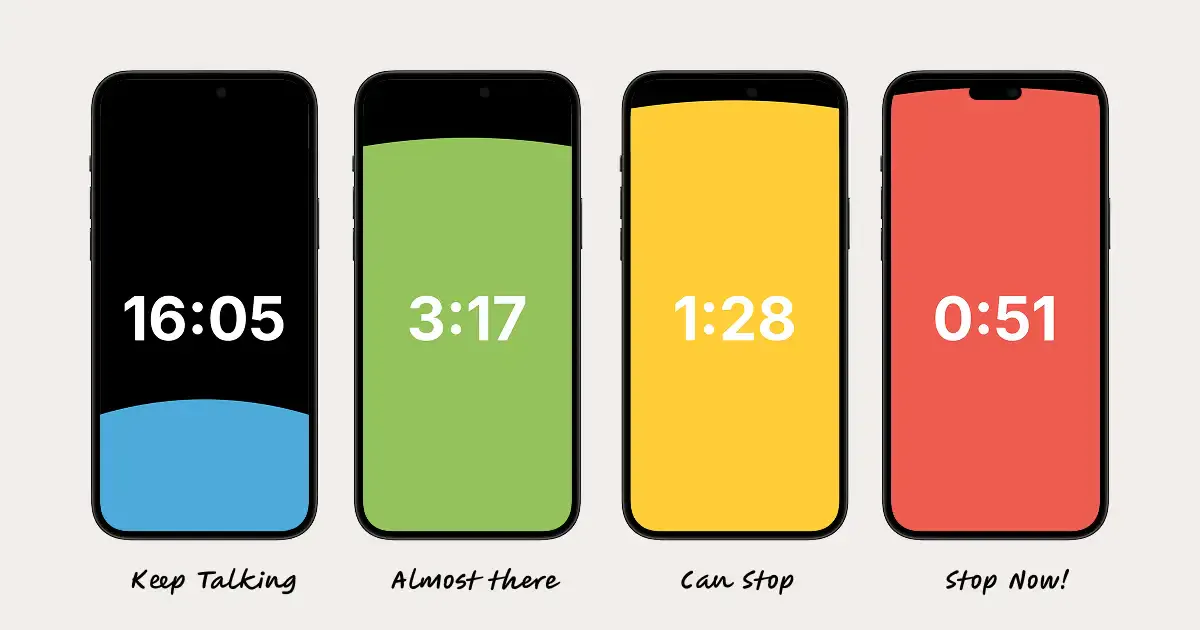
Presentation Timer is a versatile tool designed to help speakers and presenters stay on track during their sessions. With quick setup options, users can set individual timers or create complex, color-coded custom timers to suit their specific needs. Its drag-and-drop functionality allows for seamless chaining of multi-session agendas, making it ideal for conferences, workshops, and corporate presentations. The app's ability to cast to any TV or browser and control everything remotely via a phone enhances convenience and professionalism, especially in live event settings. Suitable for educators, event organizers, and business professionals, Presentation Timer simplifies time management, ensuring presentations stay within allocated slots without the need for manual timekeeping. Its user-friendly interface and remote control features set it apart, making it a valuable tool for any presenter aiming to deliver polished, timely sessions.
Screenshots
Pros
- ✓Easy-to-use interface with quick timer setup
- ✓Customizable, color-coded timers for better organization
- ✓Supports chaining multiple timers for complex agendas
- ✓Remote control capability via mobile device
- ✓Ability to cast to TVs or browsers for a larger display
Cons
- ✗Limited information on free or premium pricing tiers
- ✗No user reviews or ratings available yet
- ✗Features may be basic for highly advanced event needs
Use Cases
Pricing
Pricing not verified
Quick Info
Topics
Makers

Melvin Zammit
Alternatives
Similar Tools in Productivity




Embed Badge
Add this badge to your website to show that Presentation Timer is featured on Visalytica.
<a href="https://www.visalytica.com/tool/presentation-timer" target="_blank" rel="noopener noreferrer" style="display:inline-flex;align-items:center;gap:6px;padding:6px 14px;background:#7c3aed;color:#fff;border-radius:8px;font-family:-apple-system,system-ui,sans-serif;font-size:13px;font-weight:600;text-decoration:none;transition:background .2s" onmouseover="this.style.background='#6d28d9'" onmouseout="this.style.background='#7c3aed'"><svg width="14" height="14" viewBox="0 0 24 24" fill="none" stroke="currentColor" stroke-width="2.5" stroke-linecap="round" stroke-linejoin="round"><path d="M12 20V10"/><path d="M18 20V4"/><path d="M6 20v-4"/></svg>Featured on Visalytica</a>