
Claude for Google Workspace
Bring Claude directly into Google Docs, Sheets & Slides
About Claude for Google Workspace
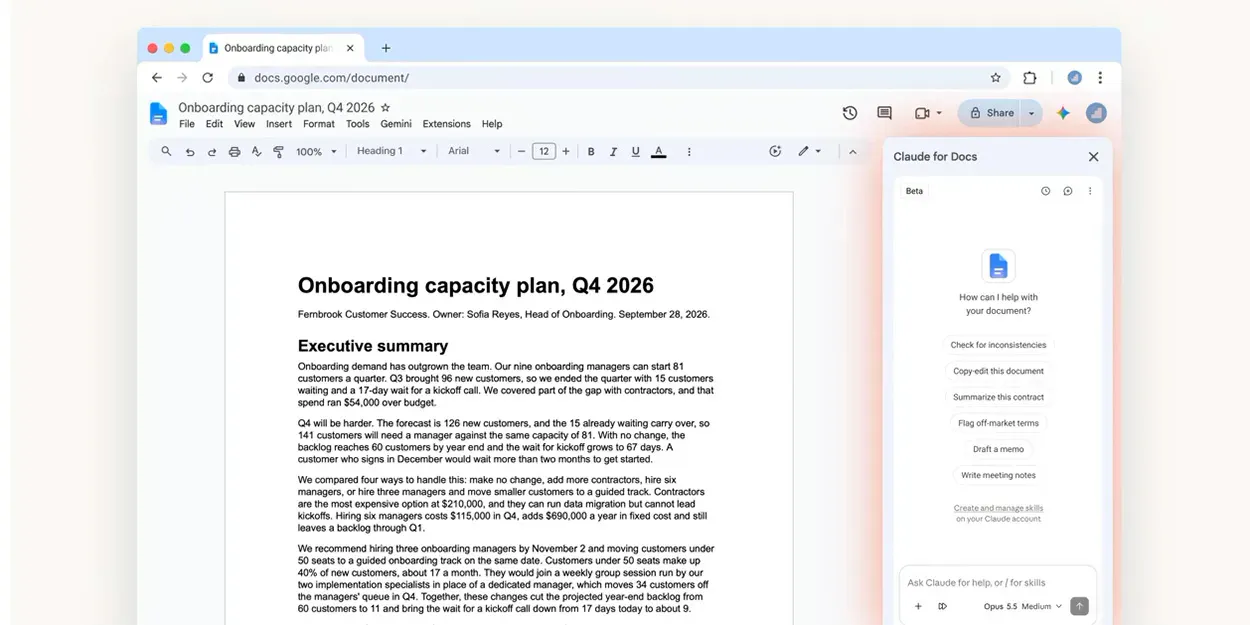
Claude for Google Workspace seamlessly integrates the power of AI directly into Google Docs, Sheets, and Slides, streamlining workflows for professionals, students, and teams. This innovative extension allows users to draft, edit, and enhance documents without switching apps, significantly reducing manual copying and pasting. Whether creating complex spreadsheets, analyzing data, generating formulas, building charts, or designing presentation slides, Claude simplifies these tasks with its natural language interface. The new connectors enable users to create and modify Google Workspace files directly from Claude, making the tool a versatile assistant that enhances productivity and creativity within familiar Google tools. Currently in beta for paid plans, this integration offers a frictionless experience for those seeking AI-driven assistance embedded within their daily workflow.
Screenshots

Pros
- ✓Deep integration with Google Workspace apps for seamless workflow
- ✓Ability to draft, edit, and analyze content within the same environment
- ✓Reduces time spent on manual copying, pasting, and switching between apps
- ✓Supports complex spreadsheet analysis and formula creation
- ✓User-friendly AI assistance for creating presentations and charts
Cons
- ✗Beta status may mean limited stability or features
- ✗Availability limited to paid Claude plans, which could be a barrier for some users
- ✗Features are dependent on the evolving capabilities of AI; may not fully replace expert input
Use Cases
Pricing
Pricing not verified
Quick Info
Topics
Alternatives
Similar Tools in Developer Tools




Embed Badge
Add this badge to your website to show that Claude for Google Workspace is featured on Visalytica.
<a href="https://www.visalytica.com/tool/claude-for-google-workspace" target="_blank" rel="noopener noreferrer" style="display:inline-flex;align-items:center;gap:6px;padding:6px 14px;background:#7c3aed;color:#fff;border-radius:8px;font-family:-apple-system,system-ui,sans-serif;font-size:13px;font-weight:600;text-decoration:none;transition:background .2s" onmouseover="this.style.background='#6d28d9'" onmouseout="this.style.background='#7c3aed'"><svg width="14" height="14" viewBox="0 0 24 24" fill="none" stroke="currentColor" stroke-width="2.5" stroke-linecap="round" stroke-linejoin="round"><path d="M12 20V10"/><path d="M18 20V4"/><path d="M6 20v-4"/></svg>Featured on Visalytica</a>