Social & Utility Suite vs Notion: Context for your agents
Side-by-side comparison of features, pros & cons, pricing, and community votes (2026).
🏆 Notion: Context for your agents leads with 187 upvotes
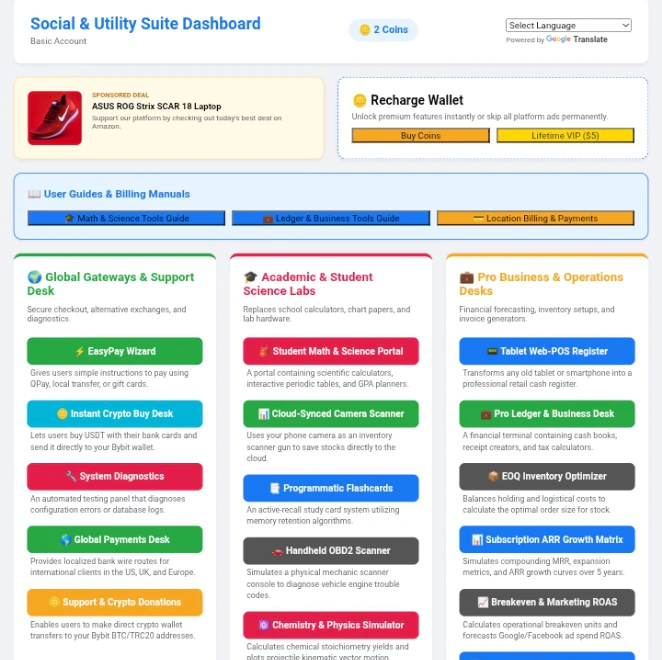
A serverless 30-in-1 web suite replacing expensive hardware.
Social & Utility Suite is a versatile, serverless web platform offering over 30 tools designed to replace costly physical hardware and streamline various business and personal tasks. Built to be mobile-responsive and data-efficient, it enables users to perform functions such as scientific calculations, biometric time tracking, shipping label optimization, and inventory management directly within their browsers. By consolidating multiple essential tools into one accessible suite, it helps small businesses, educators, developers, and individual users save money on equipment and hardware expenses, while reducing device storage and internet data usage. Its all-in-one approach simplifies workflows, eliminates the need for multiple apps or devices, and enhances productivity without the need for installation or expensive hardware investments. Its flexibility and cost-effectiveness make it especially appealing to budget-conscious users seeking robust, reliable tools in a single platform.
Pros
- Consolidates over 30 tools into one easy-to-access, browser-based platform
- Cost-effective alternative to expensive hardware investments
- Mobile-responsive and data-friendly, suitable for on-the-go use
- Reduces device storage needs and internet data consumption
- No installation required, accessible from any device with internet
Cons
- Lacks detailed information on advanced features or customization options
- Potential limitations in performance or features compared to dedicated hardware or specialized software
- No free tier or trial details provided publicly, uncertain pricing structure
Best for
- • Performing scientific calculations without physical calculators
- • Managing employee attendance with biometric time clocks
- • Optimizing e-commerce shipping labels and logistics
- • Inventory management with barcode scanning capabilities
Pricing: Likely operates on a freemium model with free access to basic tools and paid plans for advanced features, though specific pricing details are not publicly available.

Switch AI agents without re-explaining your work
Notion: Context for your agents transforms your workspace into a unified shared context layer for AI agents, making team workflows more seamless and efficient. Unlike traditional chat interfaces that reset context with each switch, Notion consolidates documents, databases, and Skills into a single accessible environment that any MCP (Multi-Channel Platform) agent can read from and update. This integration supports connecting popular AI models like Claude and ChatGPT, as well as plugging into over 150 tools via the Skills API. The platform's upgraded version history, column permissions, and synchronized databases provide enhanced control and transparency, empowering teams to manage multiple AI agents effortlessly. Designed for collaborative teams leveraging AI automation, Notion’s approach simplifies switching contexts and ensures continuity across projects, reducing repetitive re-explanations and boosting productivity.
Pros
- Centralizes workspace data for multiple AI agents, enhancing context continuity
- Supports integration with popular AI models and over 150 tools via Skills API
- Provides version history, permissions, and synchronized databases for better management
- Simplifies switching between AI agents without re-explaining work
Cons
- Requires setup and integration effort for teams new to Notion or AI tools
- Limited details on pricing and licensing in the provided info
- Might be complex for small teams or individual users
Best for
- • Managing multiple AI assistants across different projects
- • Maintaining shared knowledge bases accessible by various AI agents
- • Streamlining workflows that depend on switching between different AI models
- • Collaborative content editing and version tracking with AI involvement
Pricing: Pricing not verified