Notchling vs Stitch 2.0 by Google
Side-by-side comparison of features, pros & cons, pricing, and community votes (2026).
🏆 Stitch 2.0 by Google leads with 841 upvotes
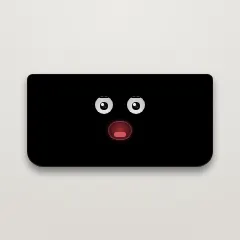
A little creature that lives in your MacBook notch
Notchling is a whimsical yet functional Mac application that introduces a charming digital creature inhabiting your MacBook's notch. Designed for Mac users seeking a touch of personality and convenience, Notchling observes your cursor activity, rests when idle, responds to battery status, and interacts with file drag-and-drop actions by opening its mouth and carrying the file. Its small size, under a megabyte, ensures minimal impact on system resources, and its privacy-conscious design guarantees no data leaves your Mac. The app offers a playful way to personalize your Mac experience while subtly enhancing productivity through its interactive features. Perfect for users who appreciate quirky, eye-catching utilities that blend fun with function, Notchling stands out as an innovative addition to the Mac ecosystem.
Pros
- Lightweight and under a megabyte, minimal system impact
- Privacy-focused with no data leaving the Mac
- Adds a fun, engaging element to the MacBook notch
- Automatically responds to cursor activity and battery status
- Simple drag-and-drop file interaction
Cons
- Limited functionality beyond visual and interactive features
- May not appeal to users seeking serious productivity tools
- Currently lacks advanced customization options
Best for
- • Personalizing and enhancing the visual appeal of MacBook notches
- • Creating a playful workspace environment
- • Engaging users who enjoy quirky tech accessories
- • Demonstrating fun AI or interactive design concepts
Pricing: Pricing not verified

Vibe design beautiful production-ready UI in seconds
Stitch 2.0 by Google is an innovative AI-native design tool that streamlines the creation of high-fidelity user interfaces. It empowers designers, developers, and product teams to generate beautiful, production-ready UI using natural language commands, voice, and context-aware agents. The platform supports designing across images, code, and text seamlessly within a single canvas, enabling users to iterate rapidly and produce prototypes instantly. Its integration of built-in design systems and the DESIGN.md format ensures consistency and efficiency, making the transition from idea to interface faster than ever. Ideal for teams seeking a smarter, more intuitive approach to UI design, Stitch 2.0 combines AI-driven automation with collaborative features to enhance productivity and creativity.
Pros
- AI-powered design generation for rapid prototyping
- Supports natural language, voice, and context-aware interactions
- Unified canvas for images, code, and text simplifies workflows
- Built-in design systems and DESIGN.md for consistency
- Fast iteration and collaboration features
Cons
- Relatively new with potential for ongoing feature development
- May require some learning curve for non-technical users
- Pricing details are not explicitly disclosed, which could impact budgeting
Best for
- • Rapid creation of UI prototypes for startups and product teams
- • Iterative design processes driven by natural language commands
- • Collaborative design sessions with remote teams
- • Maintaining design consistency across large projects
Pricing: Likely follows a freemium model with free tier options and paid plans starting around a moderate subscription fee, typical for AI-enhanced design tools. Exact pricing details are not publicly specified.