Gboard Kurukuru Version vs Rork Max
Side-by-side comparison of features, pros & cons, pricing, and community votes (2026).
🏆 Rork Max leads with 1476 upvotes
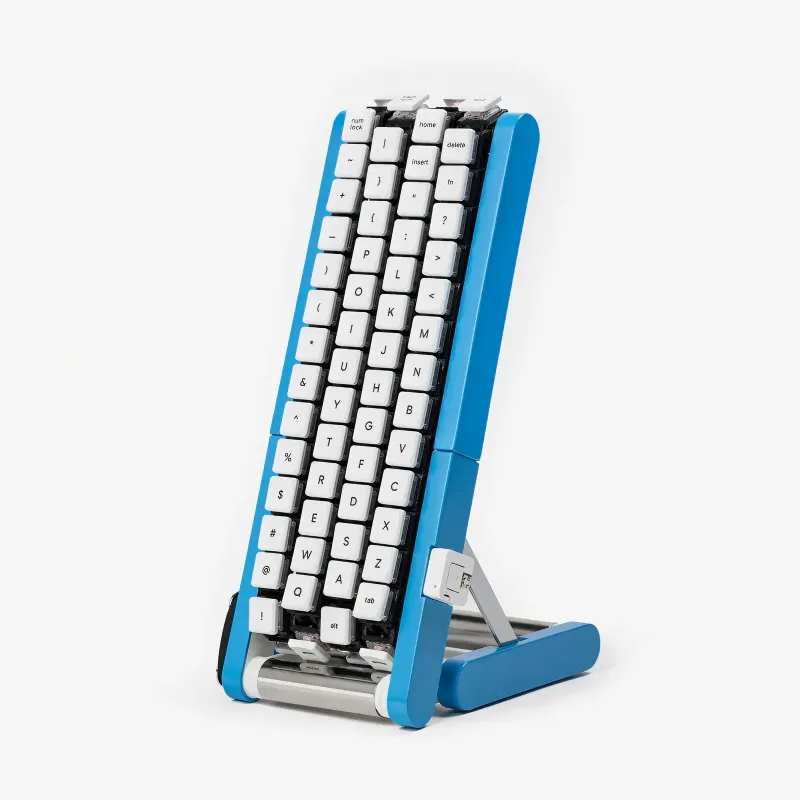
Your fingers stay put. The keys come around
Gboard Kurukuru Version is an innovative conveyor belt keyboard designed by Google Japan's Gboard team. Unlike traditional keyboards, it features four rotating belts, each carrying 29 keys, that pass characters past your fingers in a continuous loop. This unique design allows users to reach every character with just one hand, making it ideal for ergonomic typing and rapid input. As a DIY project, it is not available for sale but offers STL files, firmware, and a comprehensive build guide on GitHub, making it accessible for hobbyists and custom keyboard enthusiasts. Its distinctive conveyor belt mechanism and open-source approach set it apart, appealing to those interested in hardware hacking, custom configurations, or crafting their own ergonomic input devices.
Pros
- Innovative conveyor belt design enables one-handed operation
- Open-source resources facilitate customization and DIY assembly
- Allows for a highly personalized keyboard setup
- Encourages engagement with hardware hacking and electronics
Cons
- Requires technical skills to build and assemble
- Not commercially available for immediate purchase
- Potentially complex setup for beginners
Best for
- • DIY enthusiasts building custom ergonomic keyboards
- • Individuals seeking one-handed input solutions
- • Hardware hackers experimenting with conveyor belt mechanisms
- • Users interested in open-source keyboard projects
Pricing: Pricing not verified

Best AI for iOS apps. Website that replaces Xcode
Rork Max is a groundbreaking AI-powered platform designed to revolutionize app development for iOS and Apple ecosystem devices. Unlike traditional coding, Rork Max enables users to build complex, high-quality apps—including 3D games, AR experiences, body tracking, Live Activities, Siri intents, and widgets—straight from a web interface. Its unique ability to serve as the first Swift app builder accessible online makes it particularly appealing to developers, designers, and entrepreneurs seeking rapid prototyping and deployment. With seamless one-click installation on an iPhone and just two clicks to publish on the App Store, Rork Max simplifies the entire app creation process, reducing development time and technical barriers. Its focus on advanced features across all Apple platforms, including Vision Pro, sets it apart as a versatile and future-proof solution for innovative app development.
Pros
- Enables rapid app development with AI assistance
- Supports a wide range of Apple devices and features
- Web-based platform with easy installation and deployment
- Capable of creating complex apps like AR, 3D games, and body tracking
- First of its kind Swift app builder accessible online
Cons
- Potential learning curve for non-technical users
- Limited information on customization options and integrations
- Uncertain long-term pricing structure and plans
Best for
- • Rapid prototyping and testing of iOS apps
- • Creating AR and VR experiences for Vision Pro and iPhone
- • Developing interactive widgets and Live Activities
- • Building Siri intents for smarter voice-based apps
Pricing: Likely operates on a freemium model with free access to core features and paid plans offering advanced capabilities, higher deployment limits, or priority support. Exact pricing details are not publicly disclosed.