Focus Flow, Brain Dump & Task Simplifier vs Voiact - Your Trello AI Coworker
Side-by-side comparison of features, pros & cons, pricing, and community votes (2026).
🏆 Voiact - Your Trello AI Coworker leads with 21 upvotes
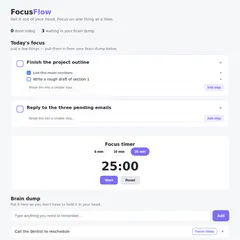
Get it out of your head. Focus on one thing.
Focus Flow is a minimalist yet powerful task management tool designed to help users declutter their minds and enhance focus. Built around the core idea that overwhelm stems from trying to remember everything at once, it allows quick capture of thoughts through a simple brain dump feature. Users can then selectively prioritize a few tasks for the day, breaking larger projects into manageable steps. Its built-in focus timer encourages short, productive work sessions, making it ideal for those seeking a straightforward, distraction-free approach to task management. With no account or subscription required, Focus Flow is accessible to anyone looking for a lightweight, no-fuss tool to boost daily productivity. Its emphasis on simplicity and deliberate task selection sets it apart from more complex project management apps, appealing to individuals who prefer a minimalist, mental decluttering approach.
Pros
- No account or subscription needed, offering instant accessibility
- Simple, intuitive interface focused on mental decluttering
- Encourages prioritization with a limited 'Today's Focus' list
- Built-in focus timer to enhance productivity sessions
- Effective for breaking down large tasks into smaller, manageable steps
Cons
- Lacks advanced features like collaboration or integrations
- Limited to a single-file system, which may not suit complex projects
- No mobile app or offline mode for extended flexibility
Best for
- • Daily task prioritization and mental decluttering
- • Breaking down big projects into smaller steps
- • Quick capture of ideas or reminders on the go
- • Focused work sessions using the built-in timer
Pricing: Focus Flow appears to be a free, no-strings-attached tool, emphasizing simplicity and instant usability without subscription barriers. It likely operates as a lightweight, single-file system with optional paid upgrades being unnecessary.

The Most Capable AI & Voice Assistant for Trello
Voiact is an innovative AI and voice assistant designed specifically for Trello users, transforming how teams manage tasks and projects. By enabling voice commands and natural language input across platforms like WhatsApp, Telegram, and Trello, it simplifies task creation, updates, and inquiries. Users can effortlessly turn spoken notes into Trello cards, ask questions for instant answers, and perform bulk updates on multiple cards simultaneously. Its automation capabilities allow for scheduled or trigger-based actions, including syncing emails and calendars, and providing timely deadline warnings. Voiact enhances productivity by seamlessly integrating web data, automating routine workflows, and supporting multi-platform communication, making project management more intuitive and responsive.
Pros
- Multichannel support for voice and text commands across WhatsApp, Telegram, and Trello
- Powerful automation features for task updates, reminders, and web data integration
- Natural language processing enables easy task creation and inquiries
- Supports bulk updates and scheduled actions to save time
- Integrates email and calendar to streamline workflows
Cons
- Limited user base and reviews, as it is a relatively new tool
- Potential learning curve for complex automation setups
- Pricing details are unclear; may require paid plans for advanced features
Best for
- • Creating Trello cards via voice commands during meetings or on the go
- • Bulk updating multiple tasks simultaneously to save time
- • Receiving deadline alerts and progress warnings to prevent slips
- • Turning emails into Trello cards or calendar events automatically
Pricing: Likely follows a freemium model with basic features available for free and premium features or integrations offered through paid plans, starting around $10-20/month, though exact details are not specified.