Focus Flow, Brain Dump & Task Simplifier vs Notion Developer Platform
Side-by-side comparison of features, pros & cons, pricing, and community votes (2026).
🏆 Focus Flow, Brain Dump & Task Simplifier leads with 0 upvotes
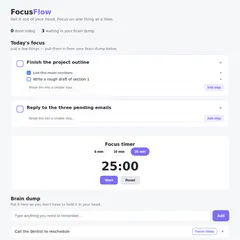
Get it out of your head. Focus on one thing.
Focus Flow is a minimalist yet powerful task management tool designed to help users declutter their minds and enhance focus. Built around the core idea that overwhelm stems from trying to remember everything at once, it allows quick capture of thoughts through a simple brain dump feature. Users can then selectively prioritize a few tasks for the day, breaking larger projects into manageable steps. Its built-in focus timer encourages short, productive work sessions, making it ideal for those seeking a straightforward, distraction-free approach to task management. With no account or subscription required, Focus Flow is accessible to anyone looking for a lightweight, no-fuss tool to boost daily productivity. Its emphasis on simplicity and deliberate task selection sets it apart from more complex project management apps, appealing to individuals who prefer a minimalist, mental decluttering approach.
Pros
- No account or subscription needed, offering instant accessibility
- Simple, intuitive interface focused on mental decluttering
- Encourages prioritization with a limited 'Today's Focus' list
- Built-in focus timer to enhance productivity sessions
- Effective for breaking down large tasks into smaller, manageable steps
Cons
- Lacks advanced features like collaboration or integrations
- Limited to a single-file system, which may not suit complex projects
- No mobile app or offline mode for extended flexibility
Best for
- • Daily task prioritization and mental decluttering
- • Breaking down big projects into smaller steps
- • Quick capture of ideas or reminders on the go
- • Focused work sessions using the built-in timer
Pricing: Focus Flow appears to be a free, no-strings-attached tool, emphasizing simplicity and instant usability without subscription barriers. It likely operates as a lightweight, single-file system with optional paid upgrades being unnecessary.

Build on Notion, not just inside it
The Notion Developer Platform empowers teams to extend and customize their Notion workspace beyond its standard capabilities. By offering tools such as CLI, Workers, database syncs, agent tools, webhook triggers, MCP, and External Agents APIs, it allows developers to build integrated workflows, automate processes, and embed custom data operations directly within Notion. This platform is ideal for organizations seeking a unified environment where data, automation, and collaboration converge seamlessly, eliminating the need for juggling multiple tools. Its unique approach of enabling development directly inside Notion makes it particularly attractive for teams already heavily reliant on the platform, fostering innovation and efficiency in managing complex projects and workflows.
Pros
- Enables deep customization and automation within Notion
- Supports a wide range of integrations and API capabilities
- Streamlines workflows by operating inside a shared workspace
- Offers powerful developer tools like CLI and webhooks
- Facilitates building complex, scalable applications on top of Notion
Cons
- Requires technical knowledge to fully utilize features
- Potentially steep learning curve for non-developers
- Limited information on detailed pricing and plans
Best for
- • Automating data synchronization between Notion and other apps
- • Building custom dashboards and tools within Notion
- • Creating workflow automation for project management
- • Developing embedded agents for real-time notifications or data processing
Pricing: Likely operates on a custom or enterprise pricing model, potentially with tiered plans based on API usage and features. Specific pricing details are not publicly available, but it may follow a SaaS subscription approach with possible free trials for developers to experiment.